


Lark Player:Music Player & MP3
4.626.83K Reviews
App Specs
- Version
- Varies with Device
- Updated On
- License
- Free
- Downloads
- 500,000,000+
- Developer
- Lark Player Studio - Music, MP3 & Video Player
- Categories
- Music & Audio
- Platform
- Android, iOS
Screenshots
 Analysis by AppCompare
I judge a music player by what happens after the first few minutes: can I find a track quickly, make it sound right through the headphones I actually use, and keep listening without fighting the interface? Lark Player: Music Player & MP3 is built for people who want a hands-on player for local audio rather than a service centered on streaming subscriptions. Its appeal is practical, though a few of its extra features will matter more to some listeners than others.
A local library is the main reason to try it
In my experience, Lark Player makes most sense if your phone already holds music files you want to organize and play. That could be albums transferred from a computer, audio you have saved for travel, or a personal collection that you do not want to rebuild inside a streaming service. It is a free music and audio app from Lark Player Studio - Music, MP3 & Video Player, with optional in-app purchases priced from $0.99 to $6.99 per item. The app is rated for Everyone.
That focus also defines the trade-off. A streaming service is usually the more convenient choice if you want a large searchable catalog, cloud access across devices, or recommendations drawn from a broad library. A basic phone music player may be enough if you only need a play button and a queue. Lark Player sits between those options: it gives a local collection more listening controls, without making it a substitute for every kind of music service.
Its reach is substantial: it has over 500 million installs, with a 4.6 average from around 5.2 million ratings. Those figures can help establish that it is widely used, but they do not tell me whether its controls or sound options fit your habits. I would treat them as context, then decide based on how you listen and how much control you want over files already on your phone.
Sound controls reward a little experimentation
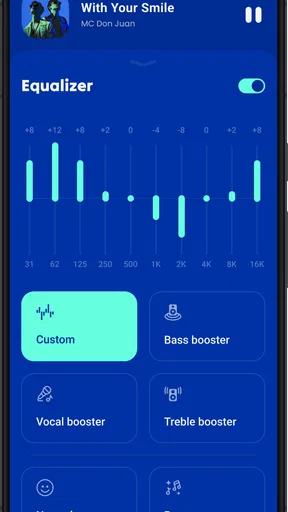
The equalizer is useful when a track sounds thin through one pair of headphones or too heavy through another. I would make small adjustments and compare the same passage at the same volume instead of immediately pushing every slider toward an extreme. That makes it easier to hear whether a change is genuinely improving the mix or simply making it louder and more dramatic. A preset can be a quick starting point, but careful tweaks are more likely to suit your headphones and the music you play most.
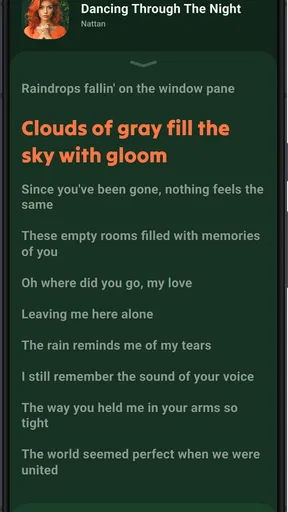
Lyrics can make listening more engaging when you want to follow a song rather than leave it in the background. They are also a feature to treat as a convenience, not a guarantee that every track will have a useful display. If lyrics are important to you, try them with a few songs from your own collection early on; that will show whether the feature fits the files and listening style you care about.
Offline listening and everyday routines
Offline playback is one of the strongest practical reasons to use a local player. Before a commute or a flight, I would check that the tracks I want are actually stored on the device and play them once while still connected. That simple check can prevent confusion later, especially if you have a mix of local files and music you normally access through other apps. Once the files are on your phone, listening does not depend on having a connection.
Worth Reading Before You Choose

Flipboard Shows What News Apps Must Do Beyond the Feed

Switching to Android Auto Means Rethinking Your Driving Routine

Google Calendar Makes a Crowded Week Easier to Manage

Ludo King Makes the Most of the Minutes Between Plans

Baby Panda World Brings Quick Play to Modern Phones, but Its Game Library Feels Busy

ESPN’s Live Game View Makes Following Close Games Easier
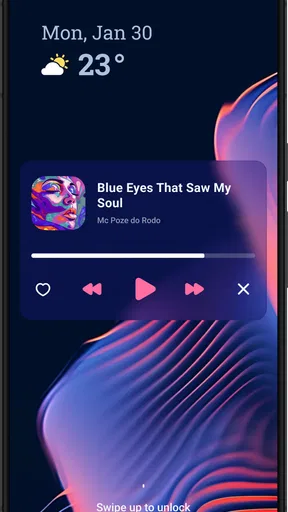
A realistic routine is to choose a short commute playlist in the morning, adjust the equalizer for the headphones you carry, and let the app play while you handle messages or other tasks. The floating player can help keep playback accessible while you move between apps, although a floating control is not essential for everyone and may feel like extra visual clutter if you prefer a completely unobstructed screen. I would try it during an ordinary day and keep it enabled only if it saves you taps.
The sleep timer is another small feature with a clear use: set music to stop when you are winding down instead of relying on yourself to remember to pause it. For a bedtime routine, I would choose a stopping point that leaves room to settle in, then check the timer once before putting the phone down. This is a better fit for someone who listens while falling asleep than for a listener who wants uninterrupted playback all night.
Trust, choice, and the sensible limits of a review
I am cautious about making privacy promises for any app without clear, specific information about its permissions and data practices. The practical approach is to read the permission prompts on your own device, consider whether each request makes sense for the task you are trying to do, and use the phone’s settings to review or change access where available. If a prompt surprises you, pause and decide whether you want to continue rather than approving it automatically.
The same care applies to online recommendations and optional purchases. You can focus on playing music already saved on your phone if that is all you need, and you do not have to treat recommendations as the central reason to install the app. Before buying anything, check what the purchase screen says and whether that option solves a problem you actually have. The free entry point makes it easy to assess the basic listening experience first.
Lark Player is a stronger match for listeners who want local playback, a built-in equalizer, lyrics to try, and a few convenience controls in one place. It is less compelling if your priority is a streaming catalog, seamless cloud syncing, or a minimal interface with no extra controls. The app was released on June 24, 2016, and its long presence and large audience offer useful context, but I would still judge it by how well it handles your own music library.
When it comes to music apps, my phone is a bit like an all-you-can-eat buffet. But recently, I stumbled upon Lark Player: Music Player & MP3, and let me tell you, it’s like finding that perfectly ripe avocado amid a pile of not-so-great ones. If you’re on the hunt for a versatile music player that’s as smooth as your favorite playlist, stick around because this app might just be your new jam.
Getting to Know Lark Player
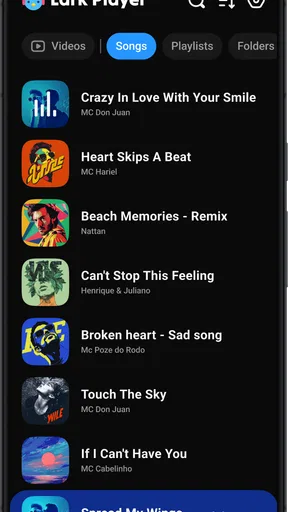
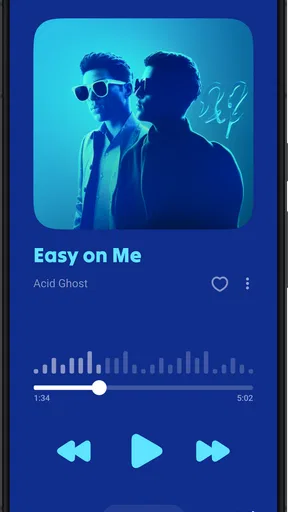
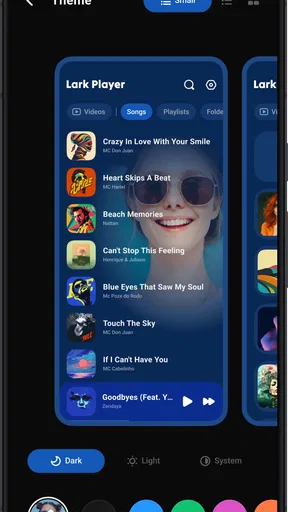
You know that feeling when you download a new app, open it, and immediately feel like you’re lost in a labyrinth? Well, Lark Player is the exact opposite. The interface is clean, intuitive, and super easy to navigate. Right off the bat, you’re greeted with a homepage that feels like a well-organized music library. The design isn’t just about aesthetics; it’s all about making your music experience as seamless as possible.
Features That Hit the Right Note
So, what’s the big deal, you ask? Let’s dive into the features that make Lark Player worth your while. First up, it supports a wide range of audio formats, which is a huge plus if you’ve got a varied music collection. From MP3 to WAV, Lark Player handles it all without breaking a sweat.
One of the standout features is the built-in equalizer. Whether you’re into bass-heavy beats or prefer a crisp treble, Lark Player lets you customize the sound to your liking. It’s like having a personal DJ in your pocket. And if you’re someone who loves to sing along, the synchronized lyrics feature is a game-changer. You’ll never miss a beat or a lyric again!
Offline and Online: Best of Both Worlds
In today’s world, having an app that works both online and offline is pretty much a necessity. Lark Player doesn’t disappoint. You can listen to your downloaded tracks without an internet connection, which is perfect for those long commutes or when you’re stuck in airplane mode.
But when you are online, the app doesn’t just sit back. It offers a variety of music recommendations based on your listening habits. It’s like it knows what you want to hear before you do, and that’s pretty impressive.
Visuals and Usability
The visual experience is another area where Lark Player shines. The app includes a floating music player that allows you to multitask while jamming out to your favorite tunes. Imagine browsing social media, checking emails, or even playing a game while your music keeps the vibe going. It’s the kind of feature that makes you wonder how you ever lived without it.
Usability is key, and Lark Player nails it with features like a sleep timer and a customizable playlist. Ever fallen asleep with music playing? The sleep timer lets you set the app to stop playing after a certain time, ensuring you don’t wake up to a dead battery.
Is Lark Player the Right Choice for You?
If you’re someone who appreciates a well-rounded music player that doesn’t just play your music but enhances it, Lark Player is definitely worth checking out. It’s not just about listening; it’s about experiencing your music in a whole new way.
For anyone looking to elevate their music experience, Lark Player: Music Player & MP3 offers the perfect balance of features, usability, and design. It’s like having a concert in your pocket, and who wouldn’t want that?
So, if you’re ready to take your music listening to the next level, give Lark Player a try. It’s available for download on both Android and iOS, so no matter what device you’re on, you’re covered. Go ahead, hit play, and let your musical journey begin!
Pros
- Intuitive user interface
- easy to navigate.
- Supports a wide range of audio formats.
- Customizable themes enhance user experience.
- Offline music playback is seamless.
- Equalizer offers diverse sound options.
Cons
- Contains ads that can interrupt playback.
- Limited features in the free version.
- Some users report occasional app crashes.
- In-app purchases needed for premium features.
- Syncing issues with certain cloud services.
FAQs for Lark Player:Music Player & MP3
What features does Lark Player offer for music playback?
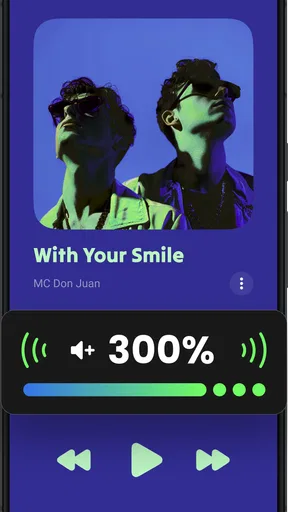
Lark Player offers a variety of features to enhance your music listening experience. It supports numerous audio formats and provides a customizable equalizer. The app includes a floating window for multitasking and a sleep timer for convenience. Users can also create playlists and enjoy music with lyrics support.
Is Lark Player ad-free, or does it have in-app purchases?
Lark Player is a free app, but it does contain ads to support its development. While the core features are accessible without payment, there are in-app purchases available for users who wish to remove ads and unlock premium features for a more seamless experience.
Can I use Lark Player offline, and how do I download music?
Lark Player allows you to play music files stored on your device offline. However, it does not support downloading music directly from the app. To listen offline, you must have the audio files already downloaded and stored on your device's memory.
How does Lark Player handle music organization and playlists?
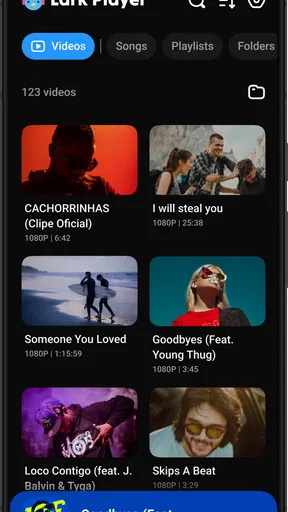
Lark Player provides intuitive music organization features. You can sort music by albums, artists, or genres, and create customized playlists. The app scans your device for audio files and organizes them automatically, making it easy to find and play your favorite tracks.
Is Lark Player compatible with both Android and iOS devices?
Lark Player is currently available for Android devices only. It is not compatible with iOS at the moment. Android users can download it from the Google Play Store to enjoy its diverse music playback features.


